Automatically sync bookings and merge tags with Hostaway.
Steps on Hostaway
- Go to Hostaway Dashboard
- Click on Marketplace within the Dashboard
- Search for Stellar Trust and click on the Connect button
- A small box will appear > Click on "Create"
- The Account ID and the API Key will be presented in a new window
- Copy your Account ID and API Key and keep them somewhere safe for later
Steps on Stellar Trust
- Go to your properties section
- Click on "Connect PMS"
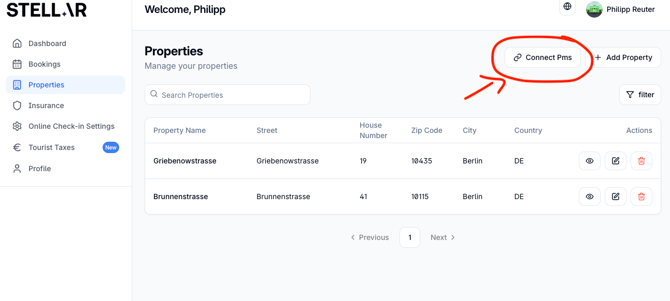
- Then select Hostaway and click on "Import Bookings"
- Add your Hostaway ID number to the ID field in Stellar Trust and add the API key to "Secret" and click save
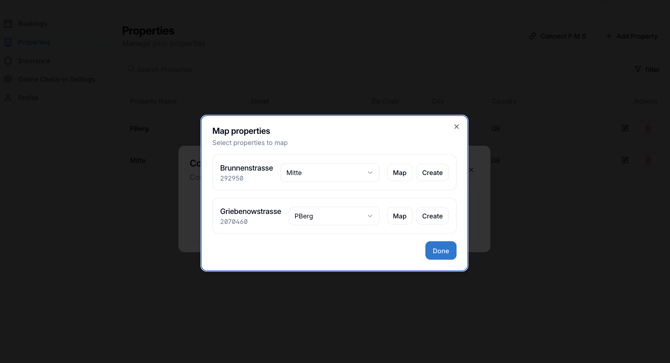
- Go back to accommodations > Connect PMS
- Match your Stellar Trust and Hostaway accommodations (or create them initially) and click save (done)
Add your placeholders/merge tags
For you to integrate the Stellar Trust online check-in, including insurance and deposit management, you can now use a merge tag inside your messages. This one is individualized.
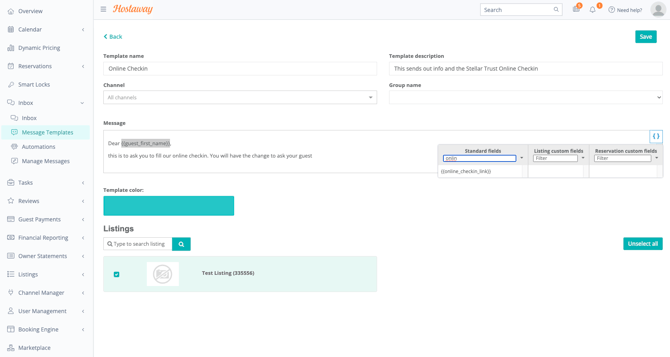
- Go to your Hostaway Dashboard and follow the path Inbox > Message templates
- Either create a new template or use an existing one
- Inside your template, add the merge tag to display the Stellar Trust online check-in link