
Learn how Hostaway AI can help with guest messaging, including AI-assisted replies, communication workflows, and ways to improve response speed and consistency.
Overview
Hostaway's Guest Messaging AI, powered by ChatGPT, helps you respond to guests more efficiently in the Inbox. The AI suggests personalized replies based on conversation history, reservation details, and listing information. By default, suggested replies are drafted for your review, but you can set individual AI Reply Rules to Auto-reply so the AI sends replies to guests automatically, without manual approval.
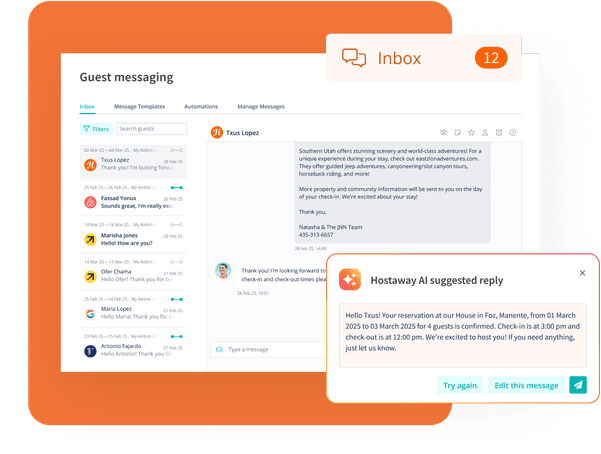
AI Replies Feature
What This Feature Does
AI Replies automatically generates suggested responses for incoming guest messages, saving you time while maintaining quality communication. When enabled, the AI analyzes your custom rules, reservation details, and property information to create contextually appropriate responses. By default, these appear in your inbox for review; if a rule is set to Auto-reply, the response is sent to the guest automatically.
How It Works
-
Enable the feature - Turn on AI-Drafted replies in your inbox
-
Set up AI Reply Rules (Recommended) - Create custom rules that match your communication style and preferences
-
AI analyzes the situation - When a guest messages you, the AI considers:
- Your custom rules
- Details about the reservation
- Information about your property listing
- AI suggests a response - A pre-written response appears in your inbox
-
You decide what to send - You can:
- Send the suggested response as-is
- Edit it before sending
- Write your own response instead
🎥 Interactive Demo: For a hands-on tutorial of how AI Reply Rules work, visit the Inbox AI Replies Setup & FAQs article.
Where to find the feature?
You can find the Hostaway AI suggested reply feature:
- In the Inbox text box, next to the attachment button. The composer also includes the AI Suggestions icon (polish a reply or draft one from a prompt) and the Translate icon (translate an outgoing message).
-
Customize AI reply tone in Settings > Integrations (options include: Assertive, Concise, Empathetic, Enthusiastic, Formal, Friendly, Informal, and Inviting)
Additional AI Features
AI-Generated Replies
Get intelligent response suggestions based on your conversation with guests
AI Suggestions in the Composer
Polish a reply you have already typed with one click, or let AI draft a message from scratch using a short prompt.
Automated Messaging Templates
Create templates to provide guests with timely information
Auto-Guest Review Templates
Encourage positive guest behavior and increase review rates
Sentiment-Based Workflows
Trigger specific actions based on guest sentiment and needs
Important Limitations ⚠️
- AI can only suggest replies for guests who have sent at least one message in the conversation
- There is a character limit affected by the length of previous messages in the conversation
- The AI can now improve a reply you have already typed using AI Suggestions in the composer, in addition to generating new replies.
Data Privacy Information
Information shared with ChatGPT includes:
- Guest name
- Number of guests
- Guest stay dates
- Standard check-in/check-out times
- Property name
- Total price
Note: While guest names are shared with ChatGPT, property addresses and other personal information are not disclosed.
Frequently Asked Questions
Q: Can ChatGPT automatically reply to guests without approval?
A: Yes, if you set a rule's Delivery to Auto-reply (Send automatically). AI-drafted replies still require your approval before sending, but rules configured for Auto-reply are sent to guests automatically, with no manual approval. Auto-reply is optional and configured per rule.
Q: What instructions guide the AI responses?
A: The AI is instructed to:
- Act as a property manager for short-term rentals
- Not sign with a name
- Only use information provided in the conversation
- Reply using relevant reservation details